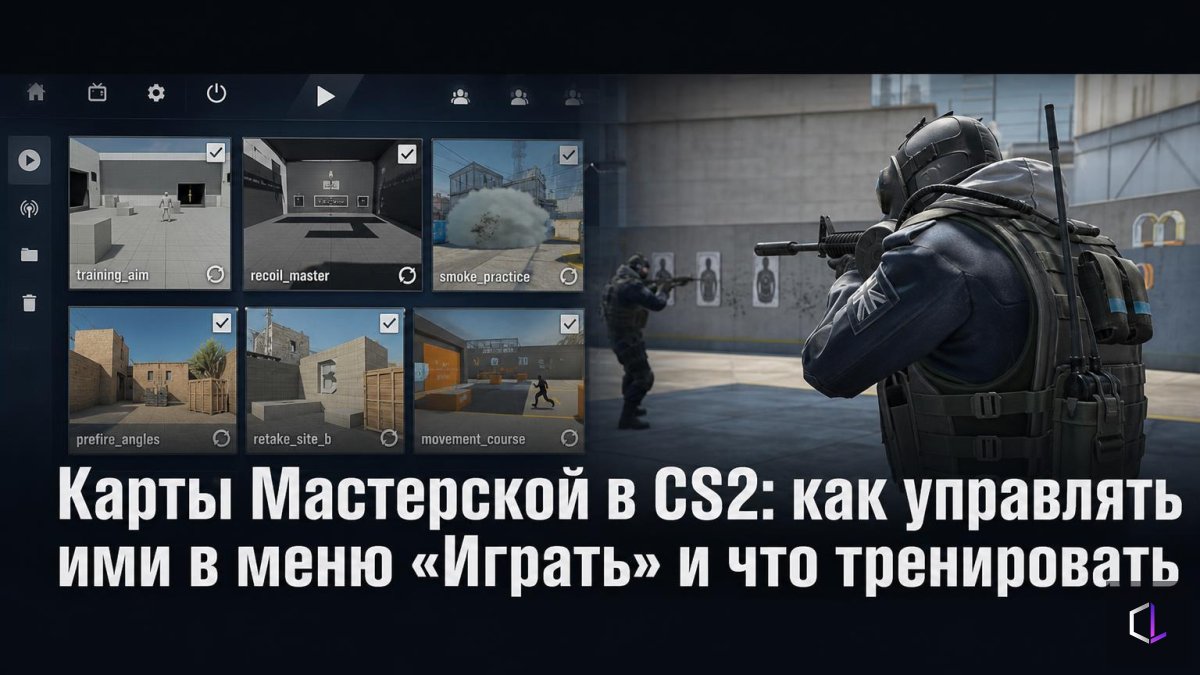
Valve has released a CS2 update of about 591 MB, and among the minor fixes in the "Miscellaneous" section there is one that is easy to miss: the Play menu now has buttons for managing downloaded Workshop maps. The Workshop is a catalog of user-created content in Steam: it is where people get training maps with targets, maps for practicing utility lineups, and modes that are not in the official game. Previously, the list of downloaded content had to be cleaned up outside the game menu. Now the controls are located right where you already choose your mode.
It is a minor interface change, but it addresses a real problem: for most players who train, the set of maps turns into a junk pile over time. You subscribed to ten maps, launched two, and the rest just sit there taking up space. Let's go over how to put things in order in a way that actually benefits your training.
How to Build a Working Set
1. Write down what exactly you are training right now. Not "aim in general," but a specific task: the first shot at medium range, a 20-bullet spray, lineups on one map. One task per week.
2. Keep one map per task. Two similar maps with targets do not give double the benefit: you simply pick the one that is more pleasant, and there is nothing to compare your progress against. Delete the extras.
3. Turn the map into a "warm-up slot." The same map, the same order of exercises, 10–15 minutes before playing. Consistency is needed so that the numbers are comparable from day to day.
4. Once a week, check what was actually launched. If a map has not been opened for seven days, then either the task is no longer relevant or the map is inconvenient. In both cases it has no business being on your disk.
5. Try a new map for one evening instead of "subscribing to everything." If after three attempts it is unclear what it gives you, delete it.
Why Order in Your Maps Matters More Than It Seems
Training maps create an illusion of work. Killing a hundred bots in a row is enjoyable, the counter keeps climbing, but it transfers poorly to a real match if you do not know what you want to improve. The paradox is that the more maps you have at hand, the easier it is to replace training with choosing: you spend half an hour scrolling through the list and five minutes shooting.
A clean list in the menu reduces this friction. When there are three maps instead of thirty, you open the game and immediately do what you came for. It sounds boring, but it is precisely such habits that distinguish regular training from occasional bursts of enthusiasm.
A separate caveat: downloaded Workshop maps, like any user-created ones, are updated by their authors. A map that worked yesterday may behave differently after the author's edit: different targets, a different order. If you are comparing results week to week and the map changed in between, the comparison loses its meaning. If you update a map, restart your count and note it down.
Also in the Patch
The remaining changes in the update are cosmetic: localized text art on the pet photo album pages and adjusted Vulkan shader cache extension flags. The latter concerns the graphics side for those who run the game through Vulkan and does not affect gameplay. For training, the menu change is what matters.
A good test of how useful this update is is simple: open the Play menu, look at the list of your downloaded maps, and honestly answer which of them you launched in the past month. Delete the ones you did not launch right now, and tie the remaining ones to a specific task and a specific day of the week.